How to Back Up WhatsApp Business Chats Before an Employee Leaves
Back up authorized WhatsApp Business records before an employee leaves, while the business account, device and required conversations are still accessible. Preserve the customer chats, supported media, contacts and managed group records needed for continuity; verify the archive; then transfer access and remove the former employee according to company policy. Do not use this process to monitor a personal account without authority.
Quick answer: Install Bakvio on an approved Windows or macOS computer, connect the business WhatsApp account your organization is authorized to manage, back up the required records, verify representative conversations and export the handover set. Bakvio cannot retrieve anything that was not saved before access ended.
Why employee departures create a WhatsApp data gap
Sales, support and operations teams often use WhatsApp for customer decisions that never reach the CRM: prices, delivery instructions, screenshots, approvals, contact changes and project history. If those records remain only on one employee’s phone or account, the business may lose context exactly when a new owner needs it.
Common failure points include:
- Nobody knows whether the account belongs to the company or the employee.
- The device is returned or wiped before data is verified.
- Customer contacts include unsaved numbers that are missing from the address book.
- Group memberships and admin responsibilities are not documented.
- Media attachments are assumed to exist but no longer open.
- A cloud backup exists, but the new owner cannot browse or search it directly.
A controlled handover addresses ownership, data scope, verification and future access together.
First confirm account ownership and authority
Before opening any archive tool, document:
- Who owns the phone number and WhatsApp account.
- Whether the device is company-owned or personal.
- Which conversations are business records.
- Who approved the backup and export.
- Which employees may access the archive.
- How long the records should be retained.
- Which privacy, employment and sector rules apply.
Do not copy unrelated personal conversations. If business and personal use are mixed, involve the appropriate HR, legal, privacy or security owner and define a narrow approved scope.
What to preserve for a useful handover
Customer conversations
Preserve chats that contain active commitments, unresolved support issues, project decisions, order history or relationship context. Include timestamps and sender direction so the next owner can understand the sequence.
Supported media
Save available quotations, invoices, photos, videos, audio and documents when they are part of the customer record. Verify important files individually; a message placeholder does not guarantee that an old attachment remains available.
Saved and unsaved contacts
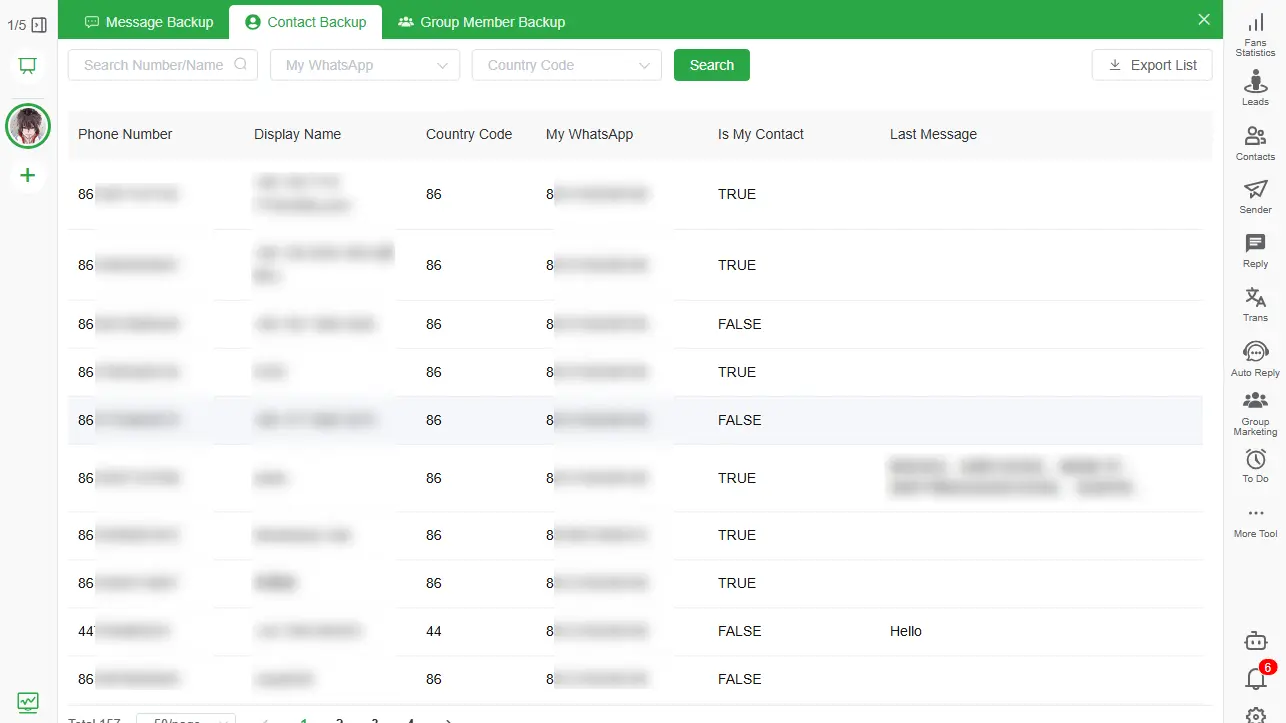
Customer numbers are not always in the phone address book. Bakvio Contact Backup can retain available numbers, names, account relationships and last-message context for authorized records.
Managed groups
For groups the organization legitimately administers, preserve available group names, member records, admin status and relevant membership events needed for continuity. Group membership is not consent for unrelated marketing.
Three-stage WhatsApp employee handover
Stage 1: Prepare before the final day
Start while the employee can still explain the account and customer context.
- Inventory business WhatsApp accounts, numbers and devices.
- Identify active customers, projects and managed groups.
- Assign an authorized backup operator and archive owner.
- Define the approved date range and record types.
- Confirm enough local disk space for chats and media.
- Prepare an encrypted computer account and restricted export folder.
- Decide which records require HTML and which require Excel or CSV.
Do not wait until the final hour. Large media sets and unclear ownership take time to resolve.
Stage 2: Back up and verify on handover day
Use the connected account while it remains available.
- Open Bakvio and complete the selected Chat Backup.
- Back up authorized saved and unsaved contacts.
- Back up managed group-member records when required.
- Search for a known recent customer instruction.
- Open an older conversation and confirm its context.
- Check representative media files.
- Export an HTML conversation for readable handover.
- Export structured records only where the recipient is authorized.
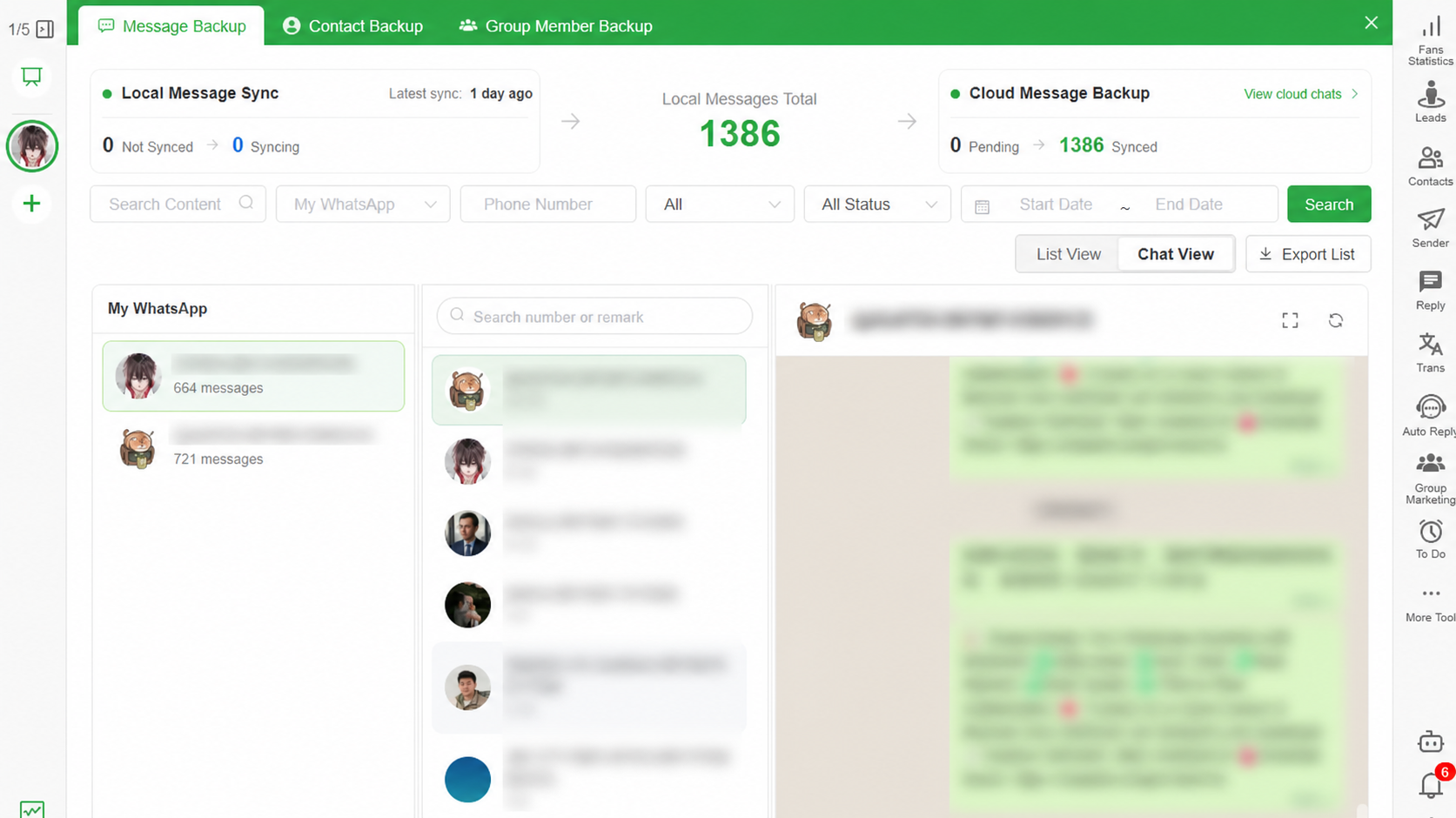
The handover is not complete because a progress counter reached a number. Another authorized person must be able to find and understand the required record.
Stage 3: Transfer responsibility and close access
After verification:
- Record who accepted the archive.
- Transfer company account and device access through approved procedures.
- Remove the departing employee from operating-system, archive and export permissions.
- Update group admins where appropriate.
- Store the handover record and verification date.
- Delete temporary copies and unnecessary exports.
- Schedule the next archive review.
The archive should become part of an ongoing business process, not a one-time offboarding folder nobody owns.
Choose the right export for the new owner
- HTML preserves readable conversation context for account managers and support handovers.
- Excel or CSV supports approved filtering, record reconciliation and system preparation.
- Media folders preserve available attachments needed to interpret the messages.
- Contact export provides structured authorized customer numbers and names.
- Group-member export supports managed-community administration where permitted.
Read How to Export WhatsApp Chats to HTML with Media before creating a large handover package.
Protect the archive after the employee leaves
Local storage places responsibility on the organization:
- Enable full-disk encryption.
- Use named user accounts instead of shared logins.
- Restrict backup and export folders by role.
- Keep records out of personal cloud folders.
- Maintain a protected second copy when required.
- Log who receives exported data.
- Apply a documented retention and deletion schedule.
Avoid emailing full archives casually. A readable HTML export may contain sensitive customer information and attachments.
What Bakvio can and cannot preserve
This workflow overview was reviewed on 08/05/2026. Product labels and availability may change.
Bakvio can preserve data that is accessible during the approved backup process and keep completed local records available for search, view and export.
Bakvio cannot:
- Recover messages or attachments that were never backed up.
- Continue collecting new data after the account becomes inaccessible.
- Restore HTML, Excel or CSV into WhatsApp.
- Guarantee every historical media file remains available.
- Decide whether the organization has legal authority to copy a record.
- Turn an export into automatically certified legal evidence.
Link handover to a repeatable backup routine
Employee departure is only one trigger. Accounts can also become unavailable because of device damage, credential loss, unexpected logout or reassignment. Use the WhatsApp Chat Backup Checklist for Small Businesses to assign owners, frequencies and verification steps before an offboarding event.
For the broader local workflow, read WhatsApp Chat Backup to PC Without Cloud Storage.
Frequently asked questions
Can a company back up an employee’s WhatsApp account?
Only when the organization has appropriate ownership, authority and a defined business purpose. Personal or mixed-use accounts require careful scope and applicable employment and privacy review.
When should the final backup be completed?
While the account, device, employee and important media are still available. Leave enough time to verify the output and correct gaps before access is removed.
Can the next employee read the backup without the old phone?
An authorized person can view data already saved in the Bakvio Backup Center and open exported HTML on an approved computer. Bakvio cannot retrieve anything missing from the completed archive.
Should customer chats be exported to HTML or Excel?
Use HTML for readable conversation context. Use Excel or CSV for approved structured work. Many handovers need HTML plus selected structured records.
Does Bakvio restore the chats to a new employee’s WhatsApp?
No. Bakvio creates a local archive and exports. Use WhatsApp’s supported transfer or restore process when live chat history must move into the app.
What about unsaved customer numbers?
Bakvio Contact Backup can preserve available saved and unsaved contact records associated with the connected account, subject to authorization and availability.
Can group members be exported during a handover?
Yes, for groups the organization is authorized to manage and for an approved operational purpose. Do not use group membership as permission for unsolicited outreach.
Complete the handover before access disappears
A useful handover gives the next owner enough verified context to continue serving customers without exposing unrelated personal data. Define the scope, preserve accessible records, test the archive and close former access deliberately.
Download Bakvio to prepare a searchable local archive for authorized WhatsApp Business handovers on Windows or macOS.
How to Back Up and Export WhatsApp Group Members
A privacy-aware guide to preserving managed group names, member details, admin status and available membership events.
Local WhatsApp Backup vs Google Drive and iCloud
Understand when to use an official cloud restore backup, a searchable local archive, or both.